Qt Reminder
Aperçu
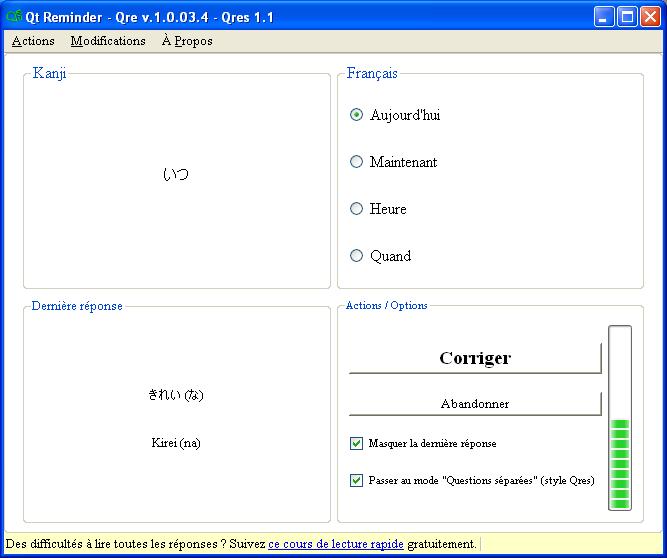
Veuillez noter que malgré les aperçus en Français, il est tout à fait possible de l'avoir en Anglais. Téléchargez normalement, puis modifiez les options linguistiques locales en anglais, si ce n'est pas déjà fait (ce qui devrait normalement être le cas si vous êtes anglophone).
Une version linux existe aussi (en anglais aussi d'ailleurs)
Description
Qre (prononcez "cure") est la partie principale de Qres.
Comment l'utiliser (Vidéo)
Pour la version 1.0, j'ai fait une formation vidéo, parce que j'ai eu beaucoup de commentaires sur la complexité de la gestion des fichiers et donc des cours.
Maintenant c'est beaucoup plus facile, et je vous montre comment faire :
Comment l'utiliser (Texte)
Pour l'utiliser, vous n'avez qu'à lui dire quel fichier .Qrec vous voulez utiliser. Ensuite, il choisira un fichier .Qrd compris dans sa configuration au hasard, puis choisira une question au hasard dans ce fichier.
Après avoir choisi le fichier .Qrec, vous n'aurez qu'à donner des réponses. Si vous vous trompez, ou si le temps s'écoule, la bonne réponse sera mise en évidence en clignotant, puis vous aurez une autre question à répondre immédiatement. Si vous trouvez la bonne réponse, vous confirmez et la fenêtre se ferme. Vous pouvez ainsi continuer ce que vous étiez en train de faire.
Après le nombre de temps que vous avez configuré avec QRec, une autre fenêtre va apparaître, avec une autre question choisie au hasard. Comme cette apparition peut être surprenante, la fenêtre apparaît graduellement, et le temps pris pour qu'elle apparaisse complètement est aussi configurable par QRec (vous pouvez le désactiver d'ailleurs).
Vous pouvez ainsi répondre à de multiples questions sur des sujets complètement différents, ou simplement vous rappeler quelques petits détails sur un sujet précis une fois de temps en temps, et tout ça en faisant autre chose. À force de toujours répondre à ces questions à cette vitesse, vous ferez des connexions et vous répondrez sans même vous en rendre compte! On peut dire que c'est apprendre ça.
Améliorations majeures
À Venir
Version 1.0.01.4 (Janvier 2010)
- Un démarrage automatique au démarrage de l'ordinateur, avec un fichier .Qrec prédéfini (pas besoin de le spécifier à chaque fois)
- Une icône dans la zone de notification. Pour savoir que Qre est en marche.
Versions précédentes
Version 0.9.09.4 (Septembre 2009)
- La réponse à la question précédente est désormais affichée au bas de l'écran. Les versions précédentes n'affichaient que le texte, mais les images sont maintenant aussi affichées.
- Implémentation de la version 4 des fichiers .Qrd et .Qrec.
- Amélioration de l'esthétique.
Version 0.9.08.3.2 (Août 2009)
- Ajout d'un accès direct aux autres applications de la suite (Qrer et QRec) dans la fenêtre de Qre, pour une modification plus rapide.
Version 0.9.07.3.2 (Juillet 2009)
- Dans la dernière version, QRec n'existait pas, et il fallait donner notre configuration à chaque fois qu'on voulait l'utiliser. Comme ce n'était pas très pratique, maintenant QRec peut faire des fichiers .Qrec qui déterminent cette configuration


